
Occasionally, risk elements present themselves in the commercial glazing business, and we believe that it is helpful to address them. Rejection of installed laminated Low E glazing due to subtle color shifts has been an issue and is the subject of this technical bulletin.
There are several influences that determine a laminated glass makeup, including the placement of Low E coatings in the overall unit.
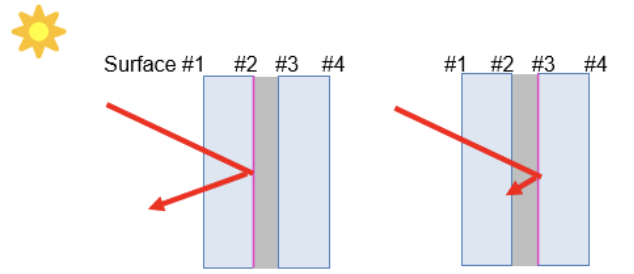
When using a monolithic Low E laminated glass make up, it would be likely that the coating would be embedded between glass layers on the #2 or #3 surface. Placing the Low-E coating inside the laminate will help prevent damage while maintaining the solar heat gain coefficient of the coating. Performance will vary based upon the coating placement.
When using a Low E laminated insulated glass unit, it is most common to have the coatings applied to the #2 surface, followed by an airspace and an inboard laminated. Alternatively, coatings can be embedded on an outboard laminate between the glass layers on the #2 or #3 surface, followed by an airspace and inboard monolithic glass. Again, performance will vary based upon the coating placement.
Embedding the Low-E coating next to the interlayer has the potential to affect the optical properties of the laminated glass. Low-E coatings are designed for use in IG units with argon or air next to the coating, so placing them in contact with the laminate’s interlayer may cause a shift in color. The extent of any color shift is dependent on several factors including the choice of coating used and whether that coating is on surface #2 or surface #3 of the laminate. Therefore, IG units with Low E coatings embedded inside the laminate may not match units with the same Low-E exposed to the IG airspace. Color shift when using embedded Low-E coatings in laminated glass is not considered a product defect, but has caused architectural rejection of installed products.
Glass samples are typically submitted for architectural approval, but since the color shift is subtle, many times it is difficult to detect. In the submittal process, we encourage contractors to protect themselves by informing all parties of the potential color volatility, and expanding the viewing to include larger samples in exterior conditions.